Tuesday, June 21, 2016

Rail Rally Release!

Do you love dinosaurs? Do you enjoy trains? Do you find yourself daydreaming about bezier curves? Do you wish that you could experience all three together!?! If that's you (and I am quite sure it is since the you not reading this wouldn't be the same you reading this), we have just delivered on your dream!

That's what we do here at Gopherwood Studios. We make dreams come true. Not all dreams, mind you. Just dreams involving things we're making come true, obviously.

What? Racing against a Zeppelin!?! Is that fair?
Behold Rail Rally! In this prehistoric adventure, the Dinosaur Train chugs across the serene hills of the Cretaceous, racing against three other formidable Troodon inventions: the Solar Train, the Rocket Train, and the Zeppelin. Test your train engineer mettle as your trusty train chugs along the rails, passing bonuses along the way that boost you past your opponents!

After you've finished trying out all four vehicles, give your child a chance to play too. All kids love HTML5 games. Mine do. They're always saying, "If it's not HTML5, it's not really a game." Not really, but one day they'll understand the wisdom of their father's words.

Thanks to the awesome folks at Jim Henson's Dinosaur Train and PBS KIDS for giving us the opportunity to make this dream come true, for you!

Friday, December 18, 2015

Dinosaur Train Gets Remodeled!

Here at Gopherwood Studios, we pride ourselves in our wide range of expertise. We're talented at game design. I'm particularly great at pressing keyboard keys. We're decent software developers. I'm also fantastic at describing how fantastic we are. And never ones to be shy about the breadth of our expertise, we're now showing off our prowess in engine development. Not game engine development, train engine development! Yes, we've become what every engineer and paleontologist aspires to be, Dinosaur Train developers. Check out how smoothly our latest creation rides the rails.

Once upon a time there was a mom. Her name was Mrs. Pteranodon...
This is a little atypical for us, since we usually make games, but the dinosaurs (especially Derek Deinonychus) really enjoyed Station Race and thought we could put more trains on more web pages. Boy were they on the right track! We really trained the Dinosaur Train home page and gave the rest of the site new digs worthy of the Cretaceous.

Have your 4-year-old check it out and let us know what she thinks! We've found that kids really dig the latest HTML5 standards (and dinosaurs and trains can be pretty cool too).

A big thanks is in order to folks at PBS KIDS and Henson for giving us the opportunity to put together the new site and pretend we're time-traveling paleontologist train engineers!

Wednesday, August 19, 2015

Lightning Runners

Todd and I had a blast working on Heartbeat - Lightning Runners; check it out! Developed in collaboration with Digital Eskimo for the University of Western Sydney, this puzzle-platformer is aimed at addressing health and culture with aboriginal children in Sydney, Australia.

AAAAaaaah! It's a Dooligah!!!
We designed unique puzzles for each level, so progress involves avoiding baddies as well as solving problems related to health.

Kuti wonders, "What could be wrong? And why is sewage pouring into the wetland?"
Also, unlike any game we've made up to this point, this one has a ferocious end-game boss!
If you think this is ugly, wait until he starts spitting phlegm.
Hope you enjoy the game, and let us know what you think!

Tuesday, May 19, 2015

Cat in the Hat: Invention Engine


We released a new game today! It's a little game called Cat in the Hat: Invention Engine. The game is all about building Rube Goldberg-esque machines to help Cat prepare for Fish's birthday party. If you've played The Incredible Machine or Amazing Alex, then you have some idea of what you're getting into.

An example of the free play mode.
The game has 25 levels that we designed and a free play mode that allows you to make your own puzzles. You can unlock more than 20 objects to play with in free mode. So, there's plenty of toys to play with.

We worked with the wonderful folks at Random House Kids and PBS KIDS to put this game together, and we're really happy how it turned out, so check it out! 

Monday, May 04, 2015

We Met Some Future Game Designers

We had the opportunity this past Monday to present at the Maiden Middle School Video Game Club. It was a ton of fun, and they were a great audience! We started with a really informative presentation, sharing a bit about ourselves, what we do, and how we do it.
VERY informative... ...leave it to game developers to turn it into a game...
After our presentation and Q&A (where they stumped us with hard questions), we had the club participate in game design with our latest alpha. We gave them about 10 minutes to play it, and then we talked about what they thought, what worked well, and what could be improved. They had some fantastic and insightful feedback that should make the game better as we continue to develop it.

Oh, and we always enjoyed these while in school, so we threw in a pop quiz... ...let us know how you do!  (Sorry, we probably won't hire you.)


Friday, May 01, 2015

Dev Log #4: Cannonball Z

If you played through the alpha then you probably already saw the cannon, but I figure I'd ramble about it anyway since it's a fun object.

The cannon idea came from wanting a new moving object to manipulate with our transforms. Cannons seemed like a good idea because cannonballs have a simple movement pattern (in a straight line until they hit something) that is predictable when transformed.

So, we can do things like this.

(Yes, the smoke trail is buggy, grr!)

The cannons themselves can also be transformed so that we can shoot in different directions.


We've made it so the cannonballs interact with other objects. They can be used to knock down walls.


They can press triggers.


And they can interact with the sheep. Though the sheep doesn't seem to enjoy it. :'(


Since cannons can hit triggers, they can even shoot other cannons. :)


Right now all the cannons are trigger-based, but we thought about having a version that auto-fires so that every puzzle that has a cannon doesn't require a sub-puzzle revolving around pressing the trigger.

Once again, we still have some things we're debating about with regard to the cannons. The main question being whether they should be cannons at all. Since the game is supposed to be in a magical forest (which is not well established by our current art) cannons don't make a lot of sense, but, everyone understands how cannons work, so it's easy to use that as a crutch. The question is, can we find something to replace them that fits in the world thematically while still being easy to grok. It's easy to think of a Mario Piranha plant-like cannon, but that feels like we're stretching, but grasping the next most generic thing. If you have any ideas on what we could replace our cannons with, we're open to ideas.

Hmm...maybe I went a little heavy on the cannon gifs...

Friday, April 24, 2015

The Shifty, Twisty Forest: Alpha Build

Originally we lost our turtle, but now we're losing our sheep...
We're excited to announce the alpha build of The Shifty, Twisty Forest! This build improves upon our initial prototype with the following improvements:
  1. Panels now transition on a tap or click, providing much better visual feedback as the level is changed.
  2. We also updated the appearance of movable panels, highlighting them with a dashed line instead of a different background color. This helps to separate the panels from the rest of the level art and make them appear more interactive.
  3. The hero is now a lost sheep instead of a lost turtle. We noticed that turtles always seem to know where they're going, so having a game about a lost turtle seemed too far-fetched.
  4. Rather than shifting a panel into empty space, panels are now swapped with one another. This fixes some of our collision issues with the prototype wherein a turtle falling through empty space would collide incorrectly with an incoming panel's collision areas.
  5. The hero pauses at the opening of a level so the player is able to take in the scene and make decisions without having to catch up with a mindless careening sheep. The hero looks mildly excited about starting though, so don't keep him waiting too long..
  6. We made the level elements a bit larger. This should make the game easier to play and see on smaller mobile devices.
  7. Bouncy springs are still in, but we also added spikes, switches, and blocks to make things a little more interesting.
  8. We removed most of the affine transformations for this build, but they'll be in the beta. We're thinking that the initial 20 levels or so will focus on shifting and then we'll introduce reflections and rotations thereafter.

Start each level by tapping the sheep, and once he's in motion, tap the movable panels to get the key and make it to the exit. Check out the progress and let us know what you think!

Thursday, April 23, 2015

Dev Log #3: A Time to Break Down, and a Time to Build Up!

After working on the self-destroying wall, I thought a natural follow-up would be a growing wall. Again, I'm stealing liberally from Kirby here.

This is really the same idea, just in reverse. We start out with all the wall blocks placed, but only the starting block is visible/collideable. When the wall is triggered, it creates a hitbox that triggers all the adjacent blocks in cardinal directions. These again have a fuse timer so that there is a cascading effect.


One unique trait to growing blocks is that they can cut each other off. So, if two sets of growing blocks cross the same part of the level, the order in which they are grown will determine their final shape. We hope this will force players to think a little more about the order they trigger switches.

Hit the switches this way one way and you get this result.

Swap them and you get this result.

A couple unresolved issues with growing blocks are collision and visualization.

Since we are introducing collision on the fly there is always the potential of something being inside the collision when it is created. We currently don't have a clean way to handle this. Destroying the colliding object wouldn't make sense since we're making a puzzle game and won't have extraneous pieces that should be removed. Shifting the overlapping object out of the collision is a better idea, but that tends to look a little junky and in general we'd prefer to avoid that situation. Our current solution is simply to avoid placing objects such that they can get caught inside collision. We'll see how long it is before we break that rule. :)

As far as visualization, right now the 'soon to be grown' blocks are hidden. I'm not sure if that's a good idea or not since the player will have to guess and check to see how things grow which may be fun or may be annoying. We could always show semi-transparent blocks instead of hiding them completely or have the backgrounds inform the player of where the blocks will grow.

Anyway, those are our thoughts at this point, if you have any suggestions on how to handle the collision or a good way to visualize the growing blocks, we'd love to hear them.


Wednesday, April 22, 2015

DevLog #2: Boom!

We've got most of the basic shifting/flipping/twisting functionality working, so we've started shifting to level design and obstacle creation.

One obstacle we've been working on is a simple switch-gate mechanic. Rather than go for a typical gate, we decided to steal liberally from Kirby and have switches that destroy clusters of blocks.

It looks like this!
The big benefit of this is that rather than having a fixed size/shape of gate, we can create whatever shape we want out of a series of blocks.

Even crazy stuff like this!
The mechanics behind it are straightforward. We have one or more start blocks, which are linked to the switch. When the switch fires the start block explodes and a circular hitbox overlaps the adjacent blocks in the cardinal directions. These blocks have a fuse timer, which when exhausted causes them to explode and trigger their adjacent blocks.

You end up with an attractive cascading effect (which will look nicer when we have real animations and not my ugly ones!) and a flexible system that can be used to create destroyable terrain of all sorts of shapes.


Monday, April 06, 2015

DevLog #1: That's Affine Transformation!

Todd alluded to the fact that we had to rework some of our math to make things work in our zeroth log. Unlike his diagnosis, I don't believe we were lying insomuch as just being sloppy. When I program a 2D platformer, I think in 2D, I breathe 2D, and I calculate in 2D. That's usually fine until it isn't.

For example, in 2D when the character changes direction, a simple scaleX *= -1 gets your character facing the right direction and you're on your way. If we need to rotate a character, setting orientation = π/2 is trivial. 2D rocks.
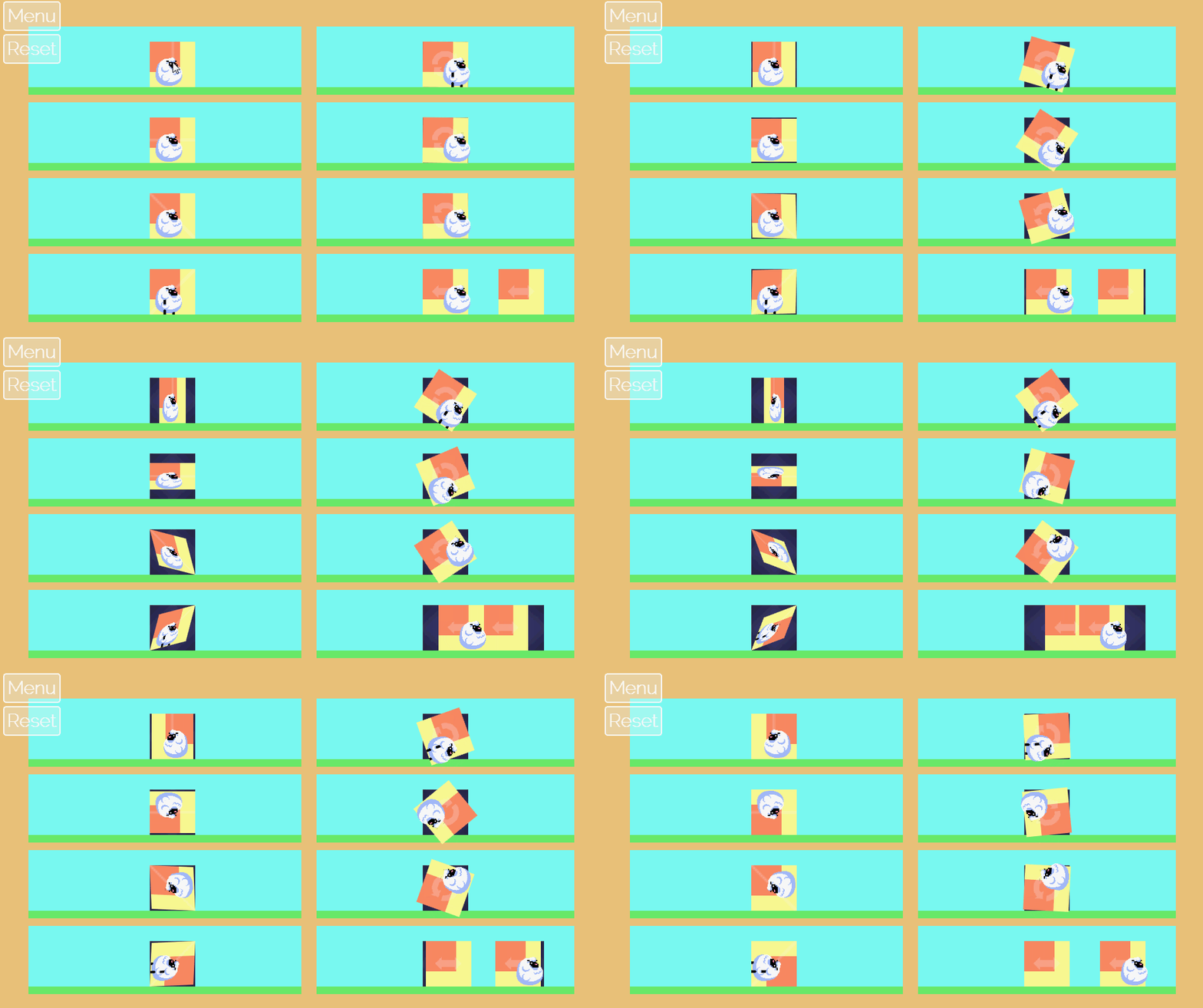
Click to get a better look at the shiftiness and twistiness.
However, this has its limitations. If we combine these transforms, things get messy. If we rotate and then flip, it's not the same as flipping and then rotating. Also when we flip, does it count as a 180 degree turn since we're about-face? And if we need to change direction again, we've really gotten ourselves in a mess: which way are we actually facing?

The problem is that we're not storing enough relevant information. Both of these cases look the same.


But they're not! This becomes quite obvious when we apply these same transformations to woolly, pixelly sheep.


That's where affine transformations come in. They can store all the data we need to render the sprites correctly. Conveniently, we can also send other vectors through these same transformations to handle other directional information like velocity. Linear Algebra is awesome like that. Essentially, an affine transformation takes a 2D plane and handles it in 3D space to put it back in 2D space in a transformed way. So our 180 rotation becomes a rotation around the z-axis, and more importantly our flip is represented as a rotation through 3D space around the y-axis.

By stacking these transforms, we can keep a record of what has happened to a given game entity and make sure we're rendering the entity correctly. In this method, each transform is represented by a 3x3 matrix as shown below.


As each transform occurs, we multiply it against the entity's current transform resulting in a new transform that completely describes its orientation. For example, if our woolly, pixelly sheep is flipped diagonally and then is later rotated 90 degrees, he's simply been horizontally flipped from his original orientation.


Our intent is to include these graphic enhancements in The Shifty, Twisty Forest alpha to make the visual transitions a bit more fluid. Check back in awhile... ...if you care (about shifty, twisty forests or woolly, pixelly sheep).

Monday, March 30, 2015

Development Log 0: The Shifty, Twisty Forest

We're starting a new game of our own! We decided that we liked our Shifty, Twisty Forest prototype enough to try fleshing it out into a full game. We're going to post regular (or irregular) updates on the development of the game so you can see how things are progressing. So, drop in every once in a while, check it out, and chime in with your opinions.

Here's a quick summary of our progress so far:

We'll get a real artist eventually.

Renovation
We started development last Monday and our main task so far has been taking a quick and dirty prototype and turning it into an upstanding and respectable piece of software. The most obvious example of this is changing how our transformations (the 'Shifty, Twisty' in the title) look. In the prototype all of the rotations, mirrors, and translates were instantaneous. Instantaneous is easy to program, but it's ugly and made the gameplay confusing (particularly mirroring). So we're in the progress of turning all our instantaneous transitions into gradual ones. Here's a gif example of a horizontal flip (it's smoother in game):

See, it's working great...oh wait!
Ok, so maybe they still need some work...

We Are Liars
In process of reworking transitions, we discovered that we are liars. Some of you may have already known this, but this was a revelation to us. Seriously though, we realized that we had been lying to ourselves about how transformations affected the objects we were transforming. In the prototype, we had represented everything in 2D using position and angular orientation. As soon as we started on smooth transitions, it became obvious that we were going to need to use 3D transforms to accurately represent the transformations. (This led to another revelation...3D math hurtz my brane!). So now we're reworking the transformations with that in mind and adding all of this to our engine so that any future games will able to take advantage of it.

+1 Programmer Art of Less Terribleness
Our final big change was revisiting the art. We decided to increase the size of character and tileset so things would be playable on mobiles. In the process we took another stab at making art. Ultimately, we're going to throw away all of the art and have a real artist do it, but Derek and I both enjoy making art and I think it helps us figure out what we want the final game to look like when we get in there and try to do it first.

The old version: functional, but drab.

So yeah, that's where we are right now. Let us know what you think.


Monday, March 23, 2015

Platypus 'Piler Plugins

Totally excited. Totally.
While working on games over the past few months, we've slowly been augmenting and bettering Platypus, the open-source HTML5 game engine that we co-created with PBS KIDS a few years ago. I'm really excited about a new compiler plugin system we created and I want to share it with you. My wife says I rarely get excited, but she also doesn't watch me code. WOOO!

Each game we develop brings its own set of challenges and requirements. When we've developed games for PBS KIDS, for example, audio is a big deal since there tends to be a lot of voice-over to guide children and buttress the educational experience. However, with a game like Entanglement, supporting multiple languages is a priority since the game is a popular past-time across the globe.

With this in mind, we created a plugin system for the Platypus compiler, so that unique games can include just the pieces they need, and, more importantly, developers can extend the compiler easily to handle new and creative use-cases we have yet to comprehend.

Since Platypus is an HTML5 engine, its compiler is written in JavaScript. Makes sense, no? We've taken the original Platypus compiler and broken it into a series of super-cool plugins. These are all enabled by default, but don't do much if their respective flags aren't set in the game config.json file. The list of plugins can be changed in the global game settings as shown:

"global": {
    "initialScene": "load",
    "plugins": ["js/pngquant-plugin.js", "js/manifest-plugin.js", "js/scripts-plugin.js", "js/language-plugin.js", "js/assets-plugin.js", "js/compression-plugin.js", "js/write-plugin.js"]
},

So what do the plugins do? Glad you're curious! Here's a quick overview:

  1. pngquant - This plugin uses the pngquant compression utility to compress PNGs. You can set how many colors each image should have, and this plugin rolls through the list of assets, smashing PNGs into significantly smaller files.
  2. manifest - This plugin tallies all the assets and creates an application cache for your game. It even handles editing an Apache .htaccess file with mod_rewrite rules so that it can cache the correct audio assets for different browsers!
  3. scripts - This plugin grabs all the JavaScript and JSON files and puts them into a single file for a faster download. It also does the same with disparate CSS files.
  4. language - This plugin uses a language table to create unique language builds for localization. It's a template system that replaces {{language-keys}} in the code with appropriate localized text. It also handles mod_rewrite's to pull the correct index.html if you choose to have multiple languages in a single build. (Alternatively, you can specify to produce multiple single-language builds.)
  5. assets - This plugin copies assets from the source files into the build locations.
  6. compression - This plugin uses the YUI compressor to compress the JavaScript and CSS files.
  7. write - This final plugin handles writing the various scripts, style sheets, and manifest files to the build locations.

The new plugin-based compiler is not yet available on the PBS KIDS Platypus source, but you can get a sneak-peek on the Gopherwood fork. 

Monday, March 16, 2015

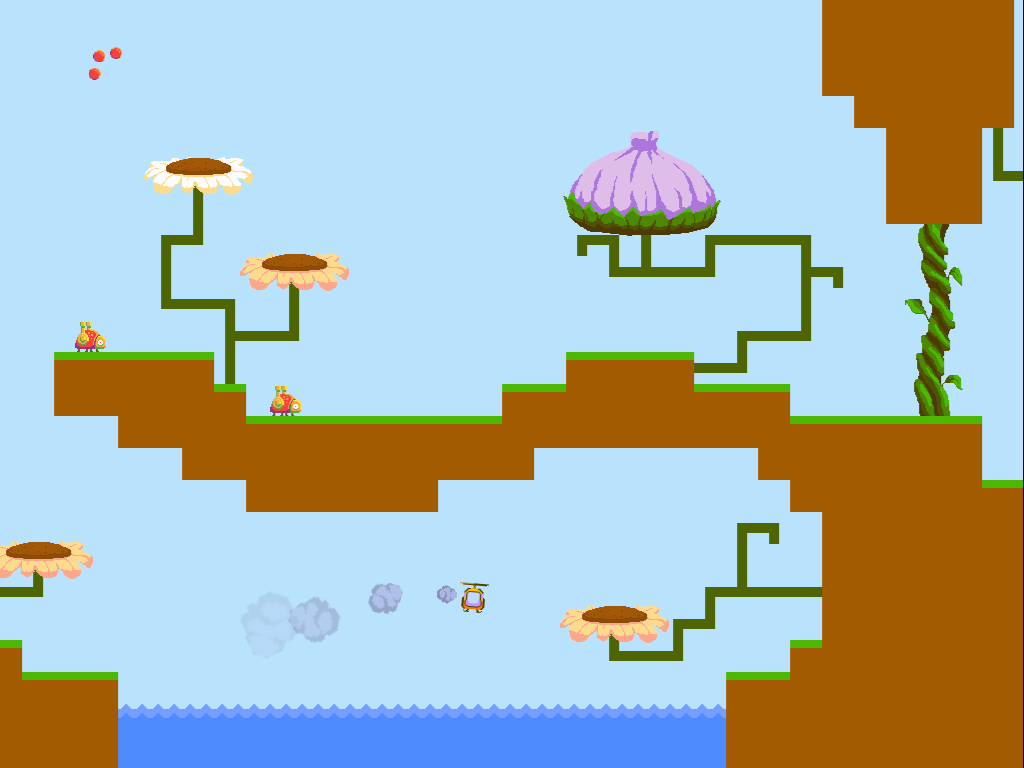
I Am Sorry. We Made Another Prototype

Derek and I want to sincerely apologize for the fact that we have made another prototype. We can't help it, it's too fun! So, check out Buzz and see what you think.


We're honestly not quite sure what it is and which direction it might grow. Right now it's a little bit physic-y, a little bit shooter-y, and a little bit nature education-y. It's also a little bit dodgy, but given that it's a prototype we weren't too worried about that. Instead, we were focused on exploring the game space that the intentionally-challenging controls afforded.


From a development perspective, Buzz has been a lesson in player capacity. I have been thinking about the idea that every player can only juggle so many tasks at once. Too many and the game becomes overwhelming and frustrating. With Buzz, a lot of the player's focus is used up controlling the helicopter. Because the controls are complicated we have to avoid overwhelming the player with other tasks/obstacles in the game. The best additions are elements that overlap with what the player is already focused on. These ideas are what led to the beetle enemy and the challenge of carrying the pollen crystal between flowers.

We're considering expanding Buzz or Shifty Twisty Forest into more fleshed out experiences. If you have opinions, questions, or comments about either, feel free to leave a comment.

Wednesday, March 04, 2015

The Shifty, Twisty Forest

Wow, that forest is just the shiftiest!
Todd and I spent the past few days putting together a game prototype: check it out! The Shifty, Twisty Forest is a story, err... ...game, about a turtle finding his way through a forest - a very blocky forest with locked yellow doors. Help him get to his destination by shifting the forest around!

We created 12 levels to explore the concept and to see whether it's fun. After you've had a chance to play through it, let us know what you think! Does this game deserve more levels, better art, and a real story line (unlike the stream-of-consciousness that caused the confusing backdrop)? Or should we leave the poor forest alone and not make it twistier and shiftier?

Here's another screenshot in case you haven't time to spend on such frivolity but like to look at things and stuff.

Monday, November 24, 2014

Rescue Ecotopia!

Have you ever wondered what would happen if someone removed almost all of the fish out of a lake?
Hacker, Buzz, and Delete carelessly pollute Ecotopia...
CHAOS. First, storks would eat up the very last few, just to survive, and then fly away to find a better lake. Then, the poor crocodiles wouldn't be able to find anything to eat in the lake with all the fish and storks gone. They'd wander into the forest and mangrove, munching on anything they could find! They might just eat all of the mudskippers flopping through the mangrove, which would terribly upset the mangrove goannas, having their snack taken away. Once there are no more mudskippers, both the crocodiles and the goannas would have to leave, and soon 5 species are gone, just because someone removed some fish! Who would do that!?!
The lake needs another crocodile. Because crocodiles rock.
Find out in our latest HTML5 game for Cyberchase - Rescue Ecotopia! This systems-thinking game was designed in collaboration with the awesome team at WNET. It was great fun making it; we hope you enjoy playing it!

Monday, July 14, 2014

New Dinosaur Train Game on PBS Kids!

The first decision in the game is a tough one.
Todd and I have been thoroughly immersed in the Cretaceous for the past few months, but we've traveled back to the future to share all that we've learned! Foremost, we're excited to share our field notes via our new game Station Race. (We scrawl field notes on our computers using JavaScript and inexplicably they show up as a game on the Internet somewhere.)

Station Race is a fun avoidance game that's fully playable on your computer or on your favorite mobile device. After a few rounds, you'll learn all about Deinonychus, Spinosaurus, and how to build railroad tracks across the Cretaceous landscape. Tap and trace your way from one station to the next as quickly as possible to pick up all the dinosaurs!

Lakes, boulders, trees, and sauropods: prehistoric track-building is hazardous.
Although the journey was rough, and the natives gigantic, Todd and I are now resident experts regarding many dinosaurs, and -- most importantly -- I am now proficient at naming each member of my children's toy dinosaur collection without reading the labels on the bottom.

We had a fantastic time working with both PBS Kids and Dinosaur Train on this project, and we hope you and your children enjoy the game and learn something new along the way!

Thursday, January 23, 2014

How I Taught a Dinosaur to Row a Boat

Go Buddy go! Do what I programmed you to do!
Each project we do presents new challenges. In the case of Dinosaur Train's River Run the new challenge for me was creating an AI for an action/racing game opponent. If you haven't played the game already (which you should, it'll help all of this make more sense), the game has two characters rafting down a river trying to collect bugs that appear along the way. The character that collects the most bugs by the end of the river wins. In two-player both of the these characters are controlled by players, but in single-player the AI handles the extra player. The goal then for my AI was to create a life-like, fun opponent to fill in when a human opponent wasn't available. To do this I broke the problem down into two pieces: river navigation (getting the character from one end of the river to the other) and bug collection (finding and navigating to bugs).

River Navigation

The river in River Run has a few characteristics that played into the river navigation problem. First, the river is not the same every game. The river is composed of pieces that are swapped in and out randomly with each race. This means that a static 'best path' cannot be created for the AI player. The AI must chart its path dynamically.
Second, the river contains solid obstacles that must be traversed around to progress. The AI is expected to be able to reliably navigate around these obstacles and make it down river. Third, the camera dictates the pace at which players can progress down the river, so the rafter AI must maintain a pace that matches that of the camera.

We did not have a discrete solution for each of these problems, rather these problems were overcome by the combination of solutions which I'll outline below.
A couple examples of node placement in river sections.
The first step in creating the AI for navigating the river was to discern a means of expressing the shape of the river so the AI could navigate it. In this case the AI doesn't need to have a complete knowledge of the river since we don't need the AI to be able to navigate to any point in the river, only those points that are necessary to traverse it in a single direction (bottom to top in our case). We chose to represent the river as a series of nodes. These nodes would serve as locations along the river path which the rafter would traverse to. By representing the river as unconnected nodes, we can reorder our level pieces without concern for links between nodes.

The actual traversal AI for the character is relatively simple. Since we want the character to move naturally we restricted its movement method to using paddle strokes like the player. Internally it is 'pressing buttons' just like the player. The AI does a search every few ticks for a target (this scanning process we'll talk about in a second). When the AI finds a target it will begin to paddle straight toward it. To make the AI paddle toward the target it determines where the target is relative to the front of the raft (to the left or right) and paddles on the opposite side. This produces a natural looking motion with the AI alternating paddles to keep its nose pointed at the target when it's target is in front of it or paddling repeatedly on the same side to turn toward a target that is beside or behind it.
The valid nodes are those above the player (the orange line) and in the middle of the screen (between the black lines).
The traversal AI is simple but it is assisted by how the targets are chosen. To find a river node to paddle toward the AI searches the list of river nodes. This search is limited to nodes that have a y-position less than the character's y (meaning they are above it on the map) and nodes that are in the middle of the current game view. With these limitations in place, the search then chooses the closest node as it's new target. If it finds a target better than the current target it replaces it. Otherwise it continues pursuing the current target.
An example of 'most-likely' paths through river sections based on the node locations.
This method of selecting nodes does a few things for us. First, it makes sure the character is only traveling down river since they won't target nodes behind them. This means that our unconnected nodes now behave more like a directed graph with paths weighted based on how close they are to the previous node. Second, by only selecting nodes that are in the center of the screen we ensure that the AI keeps pace with the screen. Finally, because the AI continually pursues a target node even after it reaches it, the traversal AI causes the character to paddle in circles around its target node once it reaches it. This behavior was not intentionally created, but it gives the AI character a pleasant looking idle behavior and gives the player the feeling that the AI is actively searching for bugs.
An example of a level layout we'd avoid. Since the AI always wants to go up a u-shape like this will snare the AI.
Because there is no course correction in the traversal code, the river layout and node layout are both critical for the AI to make it down river. The river layout must be considerate of the abilities of the AI. A key terrain concern was avoiding creating concave terrain that the character can get caught in. Since the AI only attempts to move up, a concave shape that requires the AI to reverse direction to escape would trap the AI.
An example of ill-placed nodes. The left node is closer to the character, but the path to it is blocked by terrain.
Node placement can create similar problems for the AI. Since the AI tries to travel in a straight line between nodes and always chooses the closest valid node, placing nodes so that there is a clear path between close node pairs is necessary. Placing nodes such that the closest node is unreachable could trap the AI.

Bug Catching

Bug catching reuses much of the functionality of the river navigation system with small changes.
An illustration of bug scanning. Bugs inside the white ring are close enough to be considered.
The search for bugs occurs immediately before the search for river nodes. If a chasable bug is found, the AI will give chasing the bug precedence over traversing the river. Finding a chasable bug involves a distance search around the character. The selected bug will be the closest on-screen bug within a given range. If no bugs are found within the range, no bug is selected. When a bug is selected the traversal code used for node navigation is used to navigate the character to the bug. Thankfully this code works well with moving targets too. One change we made was increasing the paddling speed when chasing a bug. This has the benefit of decreasing the turning radius of the character so they are more likely to catch the bug and also gives the impression that the AI character is excited about catching the bug.
As the AI collides with terrain the scan ring shrinks until the problem bug lies outside the ring.
Because, unlike river nodes, bug locations are not static and the search for a chasable bug does not include a check for obstacles between the character and the bug, the situation in which the AI attempts to reach an inaccessible bug is likely. Solving this 'properly' would probably involve implementing a new mechanism for mapping the river and something akin to A*, but, well, we're game developers and sometimes the easy solution is good enough. So, our solution to this problem was to alter the search distance used when finding a 'chasable bug' when a search seems to be going wrong. Each time the character collides with the terrain the bug search distance decreases. If the character repeatedly collides against the terrain, the distance value will eventually shrink to the point that the sought bug will no longer be within chasable range and the AI will 'forget' about it and move on to navigating the river. Once the AI stops colliding with terrain the bug search range slowly grows back to its original size. While this 'bumping into terrain' behavior looks silly when it happens, it happens rarely enough that it isn't distracting and it's a graceful solution to a complex problem.

A Gentle Shove

The final system that assists our AI was actually originally created for human players. When testing the game with human players we found that players wandering off-screen was a significant problem, so we put into place a buffer on the top and bottom of the screen that would push players on-screen. This buffer pushed them vertically toward the center of the screen and horizontally toward the closest river node. This ensures that players pushed off-screen by a piece of terrain will be dislodged by a horizontal push and then pushed vertically back on screen. This ended up working out well for human players and also we discovered offered a fail-safe solution to when the AI got stuck too. While it rarely happens it's nice to have a little insurance in case everything else goes wrong.

Conclusion

This concludes this quick overview of how the rafting AI in River Run works. Hopefully you enjoyed it. If you want to see the AI in action to see the strengths and weaknesses of our solution, you can check it out here. If you have any questions, feel free to leave a comment we'll do our best to answer. Thanks for reading!