Showing posts with label game design. Show all posts

Wednesday, July 31, 2019

Ready Jet Go! Space Scouts - The Lab

It's here! A brand new app, Ready Jet Go! Space Scouts, is comprised of 5 games and an open-play lab that connects them all! Compared to previous Gopherwood Studios projects, this one was the biggest yet: we designed and developed Cooking School, Rover Maker, Base Builder, Mission Control, and Food Farmer each as a standalone game, and then created the Space Scouts Home Base, badge system, and Lab in the app itself to tie the games together and create a single fun and engaging experience.

The inception for the app started with my nearly-endless enjoyment playing with Fantastic Contraption and my fascination with Lego bricks. What if we made a game that incorporated the open-play of Lego but the more-directed play of Fantastic Contraption? Wait, what if we made a bunch of different games, but you could mix and match pieces between games to make new things? As we began working through the ultimate design for this app, addressing these game design questions and considering reward structure and educational goals, I began working on an early investigative prototype to flesh out the ideas a bit more, especially regarding an open-play experience that incorporates elements from different games.


The prototype was an open-play "Lab" that focused on a pin and strut mechanic. Early on, we found that this was a bit too clunky for our target audience and honestly quite frustrating on mobile devices. We continued to wrestle with the basic handling of game elements as the individual games were designed. Base Builder started with loose joints and floppy beams, which, after many iterations, ended with stiff joints and static beams to make game-play easier and more intuitive for our target audience. Rover Maker avoided beams altogether and went more of a building-block route from the onset: blocks snap together to create a rollin' rover.

As the game-play across titles solidified, integrating each of the games into the Lab proved to be a huge challenge. Base Builder and Rover Maker provided natural elements for the Lab, but Cooking School was an odd fit, and Mission Control and Food Farmer had completely different mechanics from the other three titles. Merging these into a cohesive whole required a bit of creativity.

Adding Cooking School ingredients was easy enough: playing with your food is fun. However, the kitchen tools didn't really have a place to be in the Lab, Gravity put them on the ground (which doesn't work well for various reasons, like the Mixer tool that outputs mixtures downward). They can't levitate like the game, because it looks odd and breaks the other games' elements in peculiar ways. Lastly, it opened new questions about what exactly can be processed by a kitchen tool? Astronaut dolls from Base Builder shouldn't, but what about Rover Maker wheels? Can they be fed into a Cooking School Chopper? Ultimately, we decided to add a "wall" block, identical to the Rover Maker blocks in functionality, but visually conveying the sense that kitchen tools could be "pinned" to them. Kitchen tools were then implemented to behave just like Rover Maker rockets and wheels: they can be attached to blocks and won't process other pin-able things like wheels.

Mission Control was tougher: it doesn't really have "pieces" of things to work with like the other titles. So for this game, I added Boop, the rover, and Jet 2, Jet's trusty robot, as items in the Lab. The Lab play area was also extended to provide more room for these two to go exploring and interact with other Lab items.

Finally, Food Farmer. Adding this game into the Lab focused primarily on the food, since we already had kitchen tools in place to process vegetables! In addition to the basic food items, their various cooked, sliced, and diced versions were added. Now players could cook their watermelon and pop their corn!


That's a bit of an overview regarding the Lab and how it came together. Check out the app and see what kind of awesome machines you can make in the Lab! I just thought of something...

Gotta run... ...I'm off to build a battery-powered popcorn-popping, five-wheeled toppling tower on the moon!

Thursday, November 02, 2017

Entanglement Leader Boards

Entanglement has been online since the summer of 2010 (fun flashback here). Back then, we did a few things right, but in retrospect we did a lot of things wrong. One of those was the leader boards.

We must have a problem with digital hoarding.
Early on, we decided to store every score. Not sure why. We now have approximately 15,000,000 scores. Most of which no one cares about or is even able to see. For perspective, if you were to take 15 million cans of soda and dump them into the Grand Canyon... ...that would be environmentally irresponsible - don't do it.

We also stored a lot of data about each score: the score, the number of line segments, a validity check, the map it was on, the player that made it, the time it was entered, the current temperature in Hickory, NC... ...you know, a lot.

Deciding that keeping 15,000,000 scores indexed in our database is ridiculous, I'm revisiting how the scores are stored. A few years ago, I cleaned things up by dropping all scores below 50 points. I had also connected Google Games at some point to handle scoring, but its implementation in Entanglement was half-baked, so that's currently being rolled back. I've finally settled on another alternative. Rather than storing all the scores ever, it's now storing a single score for today, this week, and all time for each player. This is much more sustainable and makes loading the leader boards a lot more snappy!

This has had the biggest impact on how the Daily Challenge leader board works. It was designed to show the last 7 days of scores. As such, it has been the primary reason score storage hasn't been completely changed up to this point. To make the Daily Challenge work with this new method, it no longer stores leader boards for each day. Rather, it stores today's leader board, and at the end of the day each player is awarded points according to where they placed on that day's final leader board. These points are added to their weekly and all-time scores. The Daily Challenge Champion is awarded 50 points, other players in the top ten are awarded 10 points, and all other players receive 1 point for participation.

I've already run this algorithm on the past 7 years of Daily Challenge scores, so check out the all-time leader board to see a few really good players.

Thursday, September 28, 2017

Board Games Aren't Video Games

At first glance, creating a board game seemed pretty easy: I already have the game and the rules, so all I need to do is make things printable and, presto, a fun board game!

Now I'm a few weeks in, and I'm developing a healthy respect for good board game design and all the board game designers who make them. I've run into an assortment of discoveries, although obvious in retrospect, that might be worth sharing.

Real-life assets cost more than digital assets
When I first began designing the board game, I started with the largest hexagon tiles The Game Crafter had to offer. In my mind, Entanglement tiles have always been large. In the online game, there's not really an absolute size or reference to compare them to: they just auto-resize themselves to make sure the whole map fits onscreen. But deep-down, I knew they were at least the size of Catan tiles, maybe much bigger. Maybe they were over-sized garden stepping stones in a Sakura Grove somewhere, and you could actually walk on them and follow a path to some remote destination.

Digital works just fine that way, but in real-life each tile comes at a price. I quickly realized that Entanglement became really expensive with large tiles. So I trimmed the tile size down a bit, and the price-to-content ratio seems a bit more reasonable now.

Different media require different visuals
This was a quick and easy discovery. I already knew about printing offsets due to thoroughly reading The Game Crafter's online documentation, and made sure I used their templates with plenty of bleed room and the like. Aside from that, I pretty-much mimicked the web game's tile style.

I ordered the first set of Entanglement tiles from The Game Crafter, thinking at most I may need to update the paths to make sure they match correctly on all 6 sides. That turned out just perfect, but my other assumptions didn't.

I found that the thin lines didn't look great and could be a bit confusing. Especially since they didn't light up or do anything fancy when they're connected (print is so 20th century). So for my second run, I thickened up the lines and they look much nicer.

Real play is sloppier than digital play
This should have been a no-brainer. Coming from a job where I deal with math and numbers and precise values, anything sloppy is probably a bug... ...and finding bugs requires testing. Interestingly, I was so confident in how solid Entanglement's game-play is, I hadn't thoroughly tested the real-life version. Why check and change the rules if things work so well already? That was a mistake.

I decided to record a game to have snippets for an online promo, so my boys played with me. We started by placing the starting tile, and then placing the outer wall. That was a feat: we never seemed to be able to get all the wall tiles to line up in that classic Entanglement hexagon, the start tile never seemed to be in the exact center, and setting it all up wasn't particularly fun.

Finally, once that was out of the way, we began playing. And the tiles moved. A lot. It wouldn't have been that terrible in of itself (map-building board games tend to have this problem), but when the growing set of tiles played out from the center start tile rotated ever-so-slightly, suddenly all 24 of the pre-placed wall tiles were in the wrong positions: the game-play grid had virtually moved without the walls moving along with it.

So after some additional real-life play-testing, I've decided to take the game in a Sakura Grove direction. Like the online Sakura Grove experience, this variation of play doesn't require walls: this allows players to jump right into the game at the beginning -- no more tediously laying out walls of tiles and no more "OCD Derek" rearranging tiles during play to make sure tiles and walls always line up.


There have been a number of other things I've learned, and I'm sure I'll learn more on this journey. This journey down a tangled path, with so many paths to choose from...

Thursday, September 21, 2017

Entanglement Board Game

The first version of Entanglement started on the back of Settlers of Catan hexagon tiles. It was not called Entanglement then: it was affectionately labelled "that game I scribbled on the back of Settlers of Catan tiles". Entanglement is not the shortest name, but when considering its original name it's not so bad. When friends came over, we would all play a round before starting a game of Settlers of Catan.


Later I wanted to play with bezier curves on the cutting-edge JavaScript canvas element (pre-"HTML5") and the first digital version of Entanglement was born! A few months later, with the help of a phenomenal artist, great musical ambiance, and a few rule changes, the current digital version arrived.

Lately I've been reconsidering Entanglement's board game origin and have been prototyping a physical version of the game. Last week I received a prototype from The Game Crafter, and it's much nicer than scribbles on the back of Settlers of Catan tiles. I played it with my sons and was soundly beaten by my 11 year old... ...I think this prototype may need more work; it's obviously broken.


In any case, if a physical version of Entanglement sounds super fun to you, go ahead and scribble on the back of your Settlers of Catan tiles (sorry, Mayfair!). If you're not willing to join the scribble-on-board-games club, hopefully I'll have something fabricated just for you in the near future!

(I just made up the whole "scribble on board games club" thing. I don't think it actually exists. But if it does exist, let me know: I really want in.)

Wednesday, August 19, 2015

Lightning Runners

Todd and I had a blast working on Heartbeat - Lightning Runners; check it out! Developed in collaboration with Digital Eskimo for the University of Western Sydney, this puzzle-platformer is aimed at addressing health and culture with aboriginal children in Sydney, Australia.

AAAAaaaah! It's a Dooligah!!!
We designed unique puzzles for each level, so progress involves avoiding baddies as well as solving problems related to health.

Kuti wonders, "What could be wrong? And why is sewage pouring into the wetland?"
Also, unlike any game we've made up to this point, this one has a ferocious end-game boss!
If you think this is ugly, wait until he starts spitting phlegm.
Hope you enjoy the game, and let us know what you think!

Monday, May 04, 2015

We Met Some Future Game Designers

We had the opportunity this past Monday to present at the Maiden Middle School Video Game Club. It was a ton of fun, and they were a great audience! We started with a really informative presentation, sharing a bit about ourselves, what we do, and how we do it.
VERY informative... ...leave it to game developers to turn it into a game...
After our presentation and Q&A (where they stumped us with hard questions), we had the club participate in game design with our latest alpha. We gave them about 10 minutes to play it, and then we talked about what they thought, what worked well, and what could be improved. They had some fantastic and insightful feedback that should make the game better as we continue to develop it.

Oh, and we always enjoyed these while in school, so we threw in a pop quiz... ...let us know how you do!  (Sorry, we probably won't hire you.)


Friday, May 01, 2015

Dev Log #4: Cannonball Z

If you played through the alpha then you probably already saw the cannon, but I figure I'd ramble about it anyway since it's a fun object.

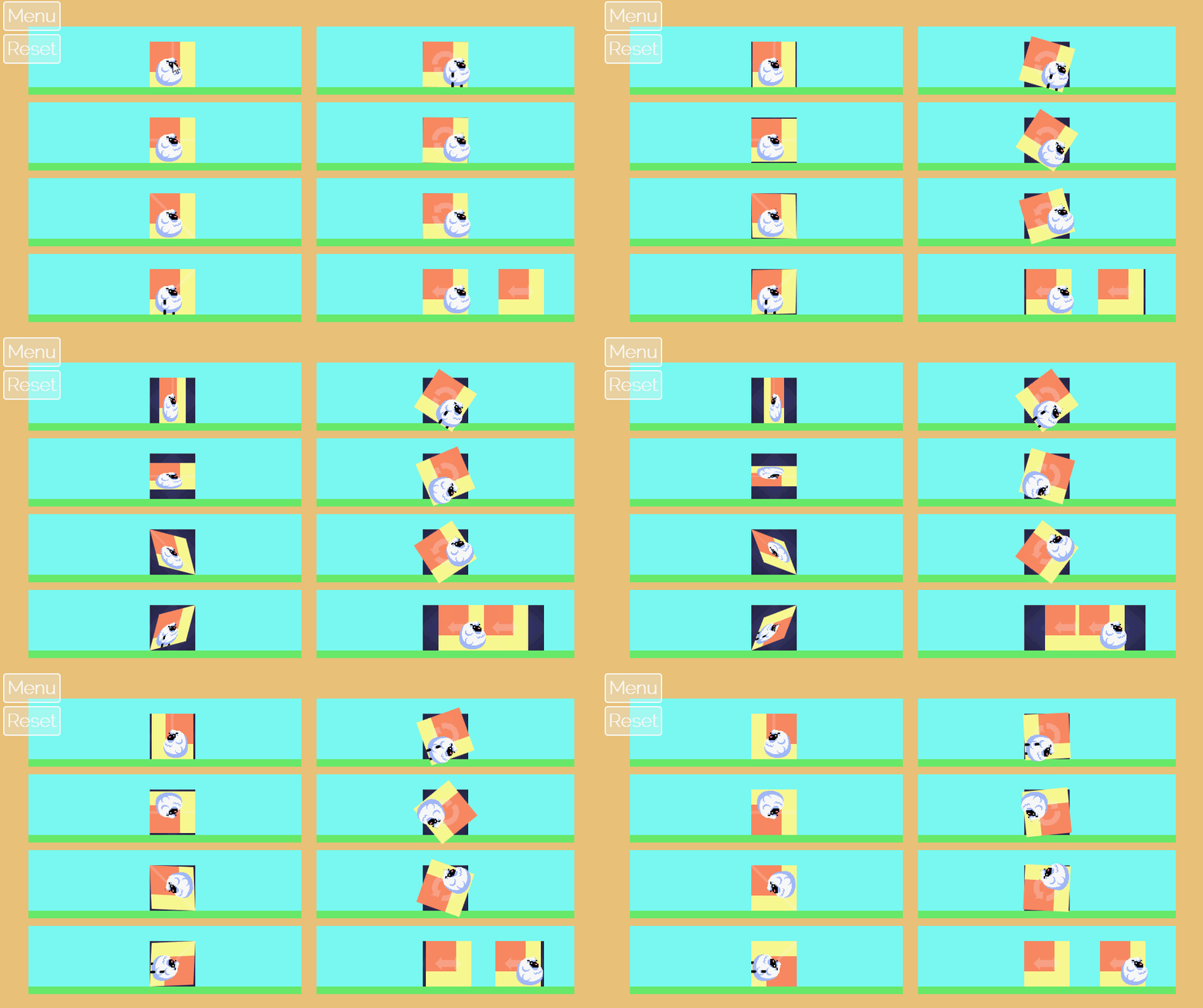
The cannon idea came from wanting a new moving object to manipulate with our transforms. Cannons seemed like a good idea because cannonballs have a simple movement pattern (in a straight line until they hit something) that is predictable when transformed.

So, we can do things like this.

(Yes, the smoke trail is buggy, grr!)

The cannons themselves can also be transformed so that we can shoot in different directions.


We've made it so the cannonballs interact with other objects. They can be used to knock down walls.


They can press triggers.


And they can interact with the sheep. Though the sheep doesn't seem to enjoy it. :'(


Since cannons can hit triggers, they can even shoot other cannons. :)


Right now all the cannons are trigger-based, but we thought about having a version that auto-fires so that every puzzle that has a cannon doesn't require a sub-puzzle revolving around pressing the trigger.

Once again, we still have some things we're debating about with regard to the cannons. The main question being whether they should be cannons at all. Since the game is supposed to be in a magical forest (which is not well established by our current art) cannons don't make a lot of sense, but, everyone understands how cannons work, so it's easy to use that as a crutch. The question is, can we find something to replace them that fits in the world thematically while still being easy to grok. It's easy to think of a Mario Piranha plant-like cannon, but that feels like we're stretching, but grasping the next most generic thing. If you have any ideas on what we could replace our cannons with, we're open to ideas.

Hmm...maybe I went a little heavy on the cannon gifs...

Friday, April 24, 2015

The Shifty, Twisty Forest: Alpha Build

Originally we lost our turtle, but now we're losing our sheep...
We're excited to announce the alpha build of The Shifty, Twisty Forest! This build improves upon our initial prototype with the following improvements:
  1. Panels now transition on a tap or click, providing much better visual feedback as the level is changed.
  2. We also updated the appearance of movable panels, highlighting them with a dashed line instead of a different background color. This helps to separate the panels from the rest of the level art and make them appear more interactive.
  3. The hero is now a lost sheep instead of a lost turtle. We noticed that turtles always seem to know where they're going, so having a game about a lost turtle seemed too far-fetched.
  4. Rather than shifting a panel into empty space, panels are now swapped with one another. This fixes some of our collision issues with the prototype wherein a turtle falling through empty space would collide incorrectly with an incoming panel's collision areas.
  5. The hero pauses at the opening of a level so the player is able to take in the scene and make decisions without having to catch up with a mindless careening sheep. The hero looks mildly excited about starting though, so don't keep him waiting too long..
  6. We made the level elements a bit larger. This should make the game easier to play and see on smaller mobile devices.
  7. Bouncy springs are still in, but we also added spikes, switches, and blocks to make things a little more interesting.
  8. We removed most of the affine transformations for this build, but they'll be in the beta. We're thinking that the initial 20 levels or so will focus on shifting and then we'll introduce reflections and rotations thereafter.

Start each level by tapping the sheep, and once he's in motion, tap the movable panels to get the key and make it to the exit. Check out the progress and let us know what you think!

Thursday, April 23, 2015

Dev Log #3: A Time to Break Down, and a Time to Build Up!

After working on the self-destroying wall, I thought a natural follow-up would be a growing wall. Again, I'm stealing liberally from Kirby here.

This is really the same idea, just in reverse. We start out with all the wall blocks placed, but only the starting block is visible/collideable. When the wall is triggered, it creates a hitbox that triggers all the adjacent blocks in cardinal directions. These again have a fuse timer so that there is a cascading effect.


One unique trait to growing blocks is that they can cut each other off. So, if two sets of growing blocks cross the same part of the level, the order in which they are grown will determine their final shape. We hope this will force players to think a little more about the order they trigger switches.

Hit the switches this way one way and you get this result.

Swap them and you get this result.

A couple unresolved issues with growing blocks are collision and visualization.

Since we are introducing collision on the fly there is always the potential of something being inside the collision when it is created. We currently don't have a clean way to handle this. Destroying the colliding object wouldn't make sense since we're making a puzzle game and won't have extraneous pieces that should be removed. Shifting the overlapping object out of the collision is a better idea, but that tends to look a little junky and in general we'd prefer to avoid that situation. Our current solution is simply to avoid placing objects such that they can get caught inside collision. We'll see how long it is before we break that rule. :)

As far as visualization, right now the 'soon to be grown' blocks are hidden. I'm not sure if that's a good idea or not since the player will have to guess and check to see how things grow which may be fun or may be annoying. We could always show semi-transparent blocks instead of hiding them completely or have the backgrounds inform the player of where the blocks will grow.

Anyway, those are our thoughts at this point, if you have any suggestions on how to handle the collision or a good way to visualize the growing blocks, we'd love to hear them.


Wednesday, April 22, 2015

DevLog #2: Boom!

We've got most of the basic shifting/flipping/twisting functionality working, so we've started shifting to level design and obstacle creation.

One obstacle we've been working on is a simple switch-gate mechanic. Rather than go for a typical gate, we decided to steal liberally from Kirby and have switches that destroy clusters of blocks.

It looks like this!
The big benefit of this is that rather than having a fixed size/shape of gate, we can create whatever shape we want out of a series of blocks.

Even crazy stuff like this!
The mechanics behind it are straightforward. We have one or more start blocks, which are linked to the switch. When the switch fires the start block explodes and a circular hitbox overlaps the adjacent blocks in the cardinal directions. These blocks have a fuse timer, which when exhausted causes them to explode and trigger their adjacent blocks.

You end up with an attractive cascading effect (which will look nicer when we have real animations and not my ugly ones!) and a flexible system that can be used to create destroyable terrain of all sorts of shapes.


Monday, April 06, 2015

DevLog #1: That's Affine Transformation!

Todd alluded to the fact that we had to rework some of our math to make things work in our zeroth log. Unlike his diagnosis, I don't believe we were lying insomuch as just being sloppy. When I program a 2D platformer, I think in 2D, I breathe 2D, and I calculate in 2D. That's usually fine until it isn't.

For example, in 2D when the character changes direction, a simple scaleX *= -1 gets your character facing the right direction and you're on your way. If we need to rotate a character, setting orientation = π/2 is trivial. 2D rocks.

Click to get a better look at the shiftiness and twistiness.
However, this has its limitations. If we combine these transforms, things get messy. If we rotate and then flip, it's not the same as flipping and then rotating. Also when we flip, does it count as a 180 degree turn since we're about-face? And if we need to change direction again, we've really gotten ourselves in a mess: which way are we actually facing?

The problem is that we're not storing enough relevant information. Both of these cases look the same.


But they're not! This becomes quite obvious when we apply these same transformations to woolly, pixelly sheep.


That's where affine transformations come in. They can store all the data we need to render the sprites correctly. Conveniently, we can also send other vectors through these same transformations to handle other directional information like velocity. Linear Algebra is awesome like that. Essentially, an affine transformation takes a 2D plane and handles it in 3D space to put it back in 2D space in a transformed way. So our 180 rotation becomes a rotation around the z-axis, and more importantly our flip is represented as a rotation through 3D space around the y-axis.

By stacking these transforms, we can keep a record of what has happened to a given game entity and make sure we're rendering the entity correctly. In this method, each transform is represented by a 3x3 matrix as shown below.


As each transform occurs, we multiply it against the entity's current transform resulting in a new transform that completely describes its orientation. For example, if our woolly, pixelly sheep is flipped diagonally and then is later rotated 90 degrees, he's simply been horizontally flipped from his original orientation.


Our intent is to include these graphic enhancements in The Shifty, Twisty Forest alpha to make the visual transitions a bit more fluid. Check back in awhile... ...if you care (about shifty, twisty forests or woolly, pixelly sheep).

Monday, March 30, 2015

Development Log 0: The Shifty, Twisty Forest

We're starting a new game of our own! We decided that we liked our Shifty, Twisty Forest prototype enough to try fleshing it out into a full game. We're going to post regular (or irregular) updates on the development of the game so you can see how things are progressing. So, drop in every once in a while, check it out, and chime in with your opinions.
Here's a quick summary of our progress so far:

We'll get a real artist eventually.

Renovation
We started development last Monday and our main task so far has been taking a quick and dirty prototype and turning it into an upstanding and respectable piece of software. The most obvious example of this is changing how our transformations (the 'Shifty, Twisty' in the title) look. In the prototype all of the rotations, mirrors, and translates were instantaneous. Instantaneous is easy to program, but it's ugly and made the gameplay confusing (particularly mirroring). So we're in the progress of turning all our instantaneous transitions into gradual ones. Here's a gif example of a horizontal flip (it's smoother in game):

See, it's working great...oh wait!
Ok, so maybe they still need some work...

We Are Liars
In process of reworking transitions, we discovered that we are liars. Some of you may have already known this, but this was a revelation to us. Seriously though, we realized that we had been lying to ourselves about how transformations affected the objects we were transforming. In the prototype, we had represented everything in 2D using position and angular orientation. As soon as we started on smooth transitions, it became obvious that we were going to need to use 3D transforms to accurately represent the transformations. (This led to another revelation...3D math hurtz my brane!). So now we're reworking the transformations with that in mind and adding all of this to our engine so that any future games will able to take advantage of it.

+1 Programmer Art of Less Terribleness
Our final big change was revisiting the art. We decided to increase the size of character and tileset so things would be playable on mobiles. In the process we took another stab at making art. Ultimately, we're going to throw away all of the art and have a real artist do it, but Derek and I both enjoy making art and I think it helps us figure out what we want the final game to look like when we get in there and try to do it first.

The old version: functional, but drab.

So yeah, that's where we are right now. Let us know what you think.


Monday, March 16, 2015

I Am Sorry. We Made Another Prototype

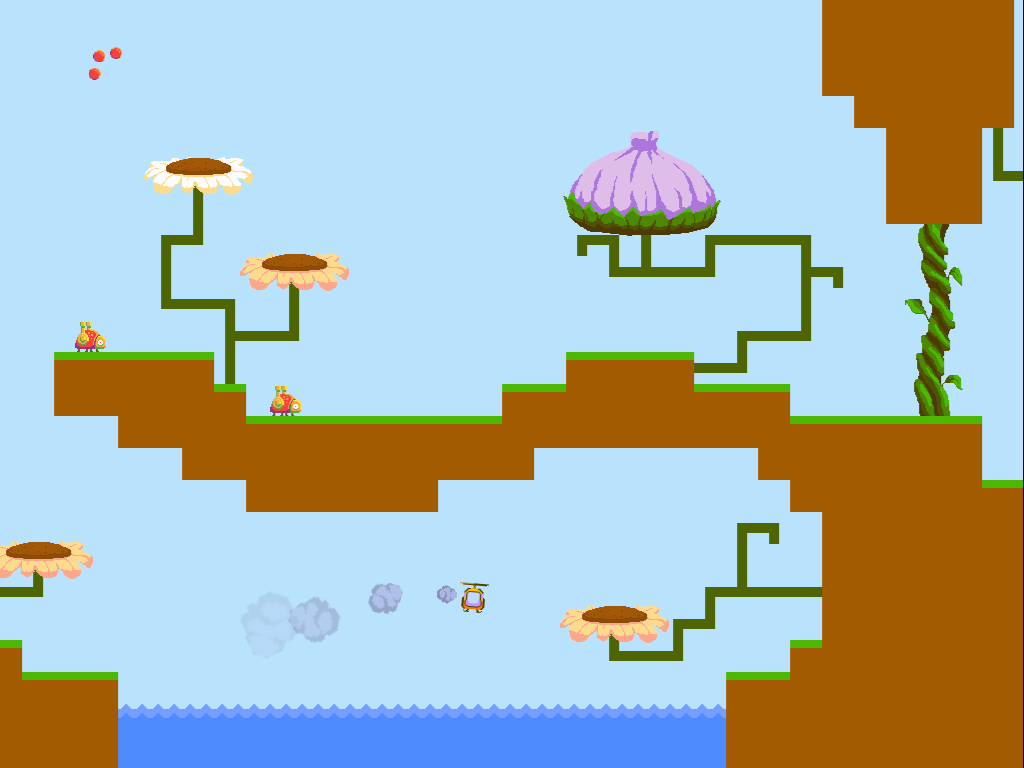
Derek and I want to sincerely apologize for the fact that we have made another prototype. We can't help it, it's too fun! So, check out Buzz and see what you think.


We're honestly not quite sure what it is and which direction it might grow. Right now it's a little bit physic-y, a little bit shooter-y, and a little bit nature education-y. It's also a little bit dodgy, but given that it's a prototype we weren't too worried about that. Instead, we were focused on exploring the game space that the intentionally-challenging controls afforded.


From a development perspective, Buzz has been a lesson in player capacity. I have been thinking about the idea that every player can only juggle so many tasks at once. Too many and the game becomes overwhelming and frustrating. With Buzz, a lot of the player's focus is used up controlling the helicopter. Because the controls are complicated we have to avoid overwhelming the player with other tasks/obstacles in the game. The best additions are elements that overlap with what the player is already focused on. These ideas are what led to the beetle enemy and the challenge of carrying the pollen crystal between flowers.

We're considering expanding Buzz or Shifty Twisty Forest into more fleshed out experiences. If you have opinions, questions, or comments about either, feel free to leave a comment.

Thursday, February 02, 2012

All the King's Men

Todd and I have been busy working on a new game called "All the King's Men". (Yes, we finally named it if you've been following us on Facebook or Google+) It's not ready to be officially unveiled for play just yet, but here's a short run-through from our initial prototype.

Originally the game was a simple puzzle grid where a player could choose between several pins to push off and collect gems of the same color. The end-goal was a bit vague and players scored by counting how many gems they pushed off. In the prototype photo below, the movement pins are represented by Lego bricks, the gems are Risk pieces, and the game board is the only part I can find of my marble chess set. Playing this version with friends quickly highlighted a problem: game-play felt like a sequence of solitary moves. One player's move didn't really affect the next player's options, so there was no multiplayer strategy or fun to the game.

Prototype comprised of Risk and Lego
These look nicer than Risk pieces
After trying several variations, Todd decided it might be better to have each player play on their own board and their actions could effect the other players. This turned out to be a lot more fun. We had already found that the puzzle grid game-play worked best with three types of gems, so we turned that aspect into three ways to affect your opponents, scaled the puzzle grid from 8x8 to 5x5, and removed all but one movement pin. Since the primary interaction between players happens outside the grid, it served well to simplify that portion of the game.

I love playing Castle Wars with my wife, so I thought a similar theme might work well for an overall goal and the three gems mechanic. We ultimately settled on armies, castles, and flying boulders, with the overall goal being for players to complete their castle or destroy all of their opponent's castles. To complete the setting, the player assumes the role of a medieval king standing at his war-room table, using the puzzle grid to gather his kingdom's resources and imprinting his seal on the resulting commands to send his valiant armies to battle.

Getting ready to unleash Dwayne, the vicious dragon, on the battlefield.
I'm looking forward to completing this game and making it available for play so someone with more skills than I can beat Todd.

Wednesday, February 23, 2011

How We Made It: Sakura Grove

In both the iOS version of Entanglement and the online Sakura Grove expansion, we've added new modes that twist the basic mechanics of Entanglement to explore new gameplay possibilities. We're really proud of how these modes turned out, so we thought it would be fun to take time to discuss what those modes are (for those who haven't played them) and some of design decisions that went into making them. We'd love to hear your thoughts on the new modes, so tell us what you think in the comments.

We'll start with Sakura Grove.


Mechanics
Sakura Grove introduces several new mechanics to Entanglement. First, players have a limited number of tiles. The player starts with seven tiles, and each play consumes a tile. When a player runs out of tiles, the game ends.

New to the board are cherry tree tiles and the golden center tile. The cherry tree tiles are pre-placed tiles located around the board. They have straight paths running through them. If the path passes through a cherry tree the player earns an extra tile to place.

The golden center tile is the starting point for the player’s path. It has 'u' paths on all of its edges. Each time the player’s path passes through a 'u', the player earns bonus points (points worth specific amounts not related to the length of the move). The amount of points received increases with each ‘u’ the player passes through.

Finally, there are no borders in Sakura Grove which means the only way to lose is to run out of tiles.

How It Came Together
The final design for Sakura Grove came together like a puzzle with each piece falling into place over the course of a few weeks.

The core idea was provide a wall-less mode that allowed players to focus on creating complex paths without the threat of walls ending the game prematurely. Needing a constraint to prevent players from playing infinitely, the tile count limitation seemed like a natural fit.

The pre-placed tiles that would later become the cherry trees were the next addition. These were introduced out of concern that the board would lack texture if there were no elements for players to consider as they created their path. Wanting to introduce more purpose to the pre-placed tiles I (Todd) initially suggested that the tiles give points for passing through them with points earning you additional tiles at certain intervals (50, 100, 150, etc.). Derek, as he often does, ignored me prefering a simpler (read: wiser) solution and directly linked earning extra tiles to passing through the pre-placed tiles. Initially, it took two passes through the tile to earn a extra tile (this is still true in multiplayer), but we found that under these conditions single-player games ended too quickly because of the amount of work required to earn an extra tile. Also, expressing the mechanic was proving troublesome. Once we decreased it to a single pass, the game felt faster and more rewarding.

While working on Sakura Grove we were thinking about how to make the new mode look unique, and we found that the pre-placed tiles provided a logical opportunity for this. Wanting to differentiate the pre-placed tiles from the standard tiles, we initially decorated them with bushes, which worked well with our Asian garden theme.  On seeing the bushes, one team member suggested that the pre-placed tiles be cherry trees that bloomed as the player passed through them. Everyone agreed this provided appealing feedback and further enhanced the theme. In the end, these cherry trees (known as sakura) would provide the name for the mode and the expansion as a whole.

How It Plays
The new mechanics significantly differentiate Sakura Grove from the classic Entanglement gameplay. The lack of walls gives the game a lighter, care-free feel. There is no fear of dying from a miss-click or a misread line. Instead, the end of the game is clearly forecast by the counter. What matters instead is that each tile be played as smartly as possible to weave through the board to rack up points and extra tiles. The shape of the board encourages you to create tightly knit bundles. These bundles pay-off in long moves earning large point values. Weighing what to pursue when (score easy tiles/points in the short term, or risk your limited tiles to set up a longer more valuable move) provides a mental challenge for those who hope to master it.

Well, that’s Sakura Grove. Look for another post on Gold Rush from the iOS version in the near future. If you’re interested in checking out Sakura Grove, you can find it in the main menu of Entanglement by clicking on “More Modes”.